
Contact your Gathid representative to discuss the most suitable method after reviewing the below list.
Ways data can be uploaded to Gathid:
- SaaS Application data extractor
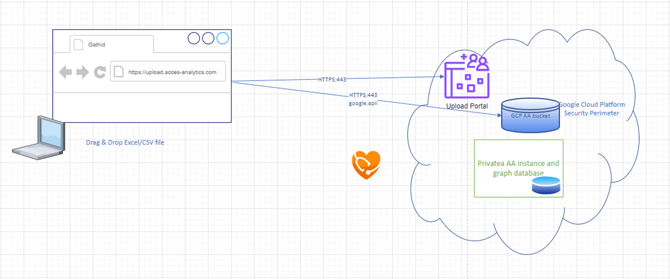
- Drag and Drop using Upload Portal
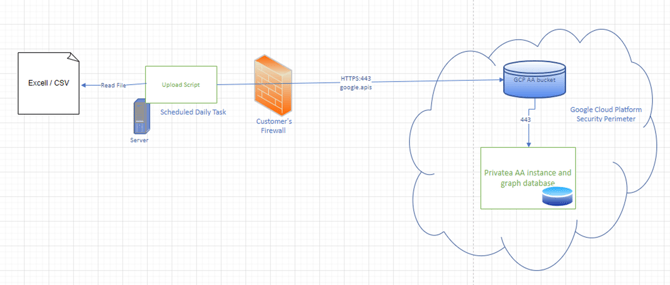
- Upload using PowerShell script
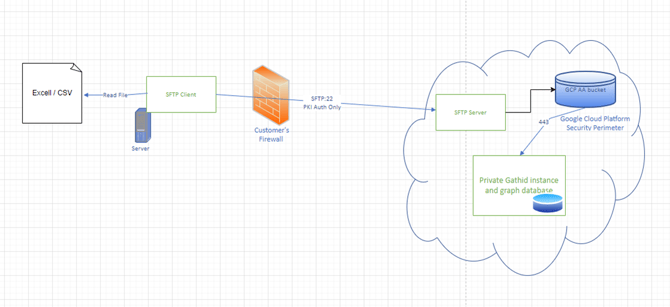
- Uploading using Secure File Transfer Protocol (SFTP)
- Configurable REST API data connector
SaaS data extractor
A System loader is configured to use a SaaS extractor to download data from a cloud application.
For the list of data connectors currently available see this list: Data Connector Guides
Manual Drag and Drop into Upload Portal
Login to the Upload Portal and upload a file in format of either:
.CSV (Comma-separated values) file or xlsx. (MS Excel)
PowerShell script
Setup configuration to Schedule a daily task to upload your data extract file to the Gathid Upload Portal.
Secure File Transfer Protocol (SFTP)
Configure SFTP using PKI keys and Whitelisting for daily upload.
Configurable REST API data connector invoked
SaaS applications supporting REST API connections can utilise Gathid's configurable data connector to extract data from the target system for Gathid to pull daily.
Click here for the guide to Gathid's generic REST API data connector.
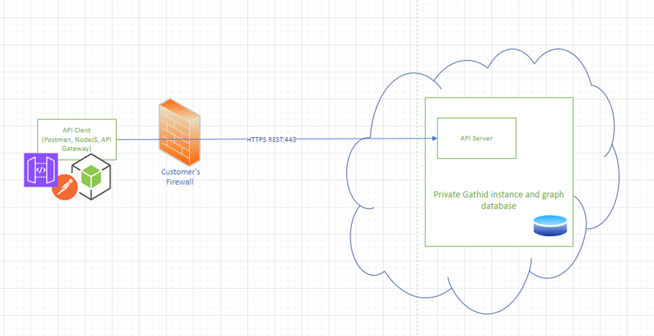
Push Data to Upload Portal using API
NEXT UP
Determine Data & Refine for import